
These are the Support Forums for FSUIPC and related products.
These forums replace the old support forums which have been running for 20+ years. The old forums contain a wealth of information on all FSUIPC products, but are now no longer available.
Please note that you will need to Register and Login to post for support, and also to download attachments. You can view these forums without registering.
Support is also available via Discord. Please use the following invite link to join the FSUIPC Discord server:
https://discord.gg/zjwUTrxmmE
All files are for FSX and you need a registered version of FSUIPC.
The "ATR_Idle_Gate" Lua script makes Idle Gate of F1's ATR72 operational, so while airborne PLs go down to FI and not GI. This also improves landing performance (i.e. more effective flare and softer touchdowns).
"ATR_Idle_Gate_v_2" is for single throttle joystick axis, while "ATR_Idle_Gate_v_3" is for double throttle.
The critical value in the script is "3200" (wherever it appears).
- disable the script, and using FSUIPC on-screen Logging facility, monitor offsets 332E (single throttle) or 3330 and 3332 (double throttle) (all type S16). Make sure that when both 'Power Levers' are at 'Flight Idle' mark, the reading is 3200 and the Torque (in aircraft gauge) is appr. 14%. If not, make a note of the reading when your 'Power Levers' are exactly at 'Flight Idle' mark and Torque at 14%. Use this figure to replace "3200" wherever it appears in the script.
- While the Flight Idle setting above gives more realistic readings, better spool up and better flare, there is one caveat. If you do a hi-speed approach (e.g. descending on ILS and decelerating using the "Deceleration Height=IASx10ft" rule) you will probably not decelerate on time. In order to overcome this, you have to assign in your FSUIPC GUI, a "LUA value". To do this:
- locate a suitable switch in your joystick (best choice would be a spring loaded, toggle switch)
- Go to "Buttons/Switches", check "Profile Specific", "Select for FS control" and select the switch you decided to use at its up position.
- At "Control Sent when button pressed", select "LuaValue ATR_Idle_Gate", with "Parameter"=3200 (or whatever the number you came up with in point 1)
- Repeat above two steps for your switch at down position, with "Parameter"=1
So now, before starting a hi-speed approach descent, just move your switch to the down position (in which you assigned "Parameter"=1).
In this manner, you are using a lower Flight Idle, that will permit deceleration as predicated by the "Deceleration Height=IASx10ft" rule. Still, just before threshold height, Flight Idle will revert to the higher value (without your intervention) and will help in flare.
Simulating turboprops in FSX has known weaknesses, and ATR is no exception. It seems that Flight1 could not find a way to have all things right at the same time. Newer turboprop models probably found better workarounds.
Many thanks to Pete for his advice in coding and to Chakko for testing the "double throttle" version.
So you can monitor your landing skills through a detailed profile from 500ft height to the threshold through flare and touchdown.
Keep on going for the perfect landing (and capture it in a screenshot) !
Both Lua's can be set to run with any of the ways that FSUIPC offers. I think Auto is best, using the [Auto} line in the FSUIPC.ini.
LandingSnitch captures data from 500ft till touchdown (and bounce if any!), including of course the vertical speed at touchdown.
It works with aircraft with retractable gear only.
The script auto-calibrates depending to aircraft weight. It is also displaying the correct power readings depending on engine type (manifold pressure for piston, torque for turboprop, N1 for jets).
The script also logs most of the captured data in FSUIPC.log, for post flight debriefing (but before your next flight).
NEW!! Actual Landing Distance and Ground Roll measurement
When the aircraft slows down below 40kts, a semi-transparent window pops up at the left of your screen, with all the details. The attached Word file ("LandingAppendix.doc") explains the contents of the popup window.


Note: Save LandingSnitch in your Modules folder as LandingSnitch.lua. Add in your FSUIPC.ini this
[Auto]
1=Lua LandingSnitch
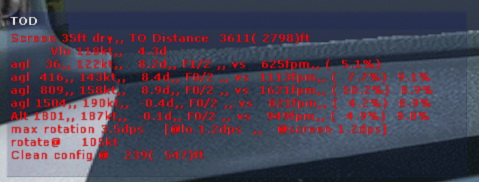
TOD plugin (TakeOff Distance)TOD captures data during take-off. Works with any aircraft (not tested with floats).Among other things, it records take-off distance, pitch rate, IAS at rotate etc (see attached Appendix.doc for all details).As with the other scripts, it logs all of the captured data (and more) in FSUIPC.log, for post flight debriefing (but before your next flight).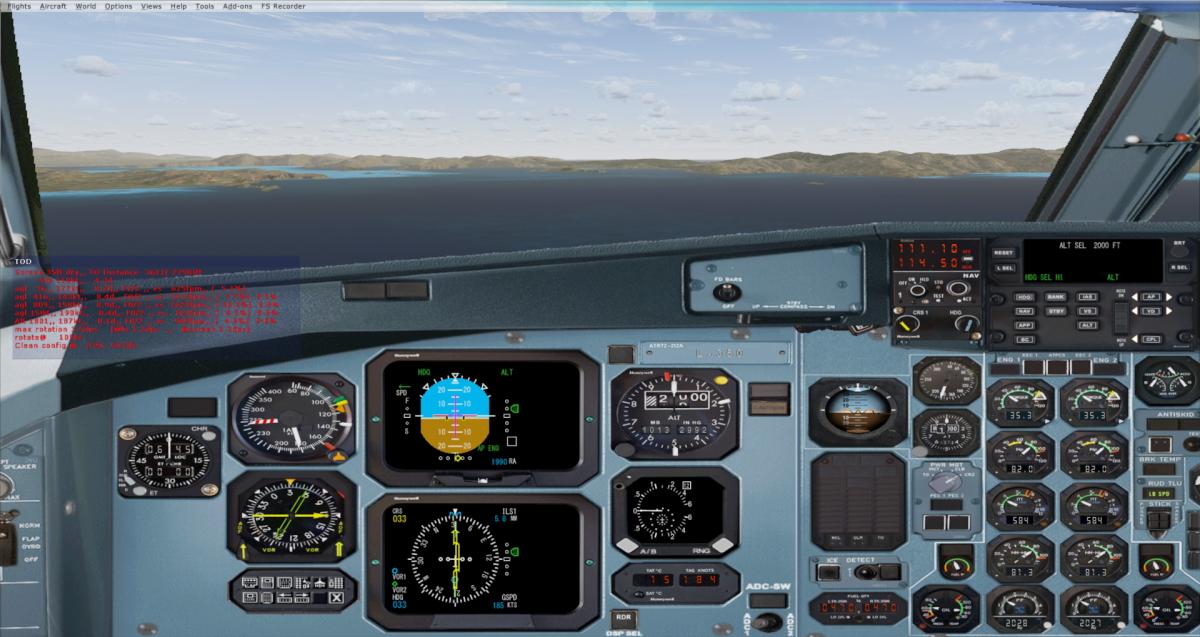
 Note:
Note:
- Save TOD.txt in your Modules folder as TOD.lua.
- Assign a key or joystick button (whatever suits you) to run the script.
- It must be activated (press the assigned button or key) when stopped at take-off position. If for any reason the aircraft changed position or simply the button was pressed at the wrong moment, just press again when ready.
- When activated, a popup window comes up for the user to enter the "Obstacle Clearance Altitude"; just enter the appropriate number (in ft) and press "enter". This is just optional (intended for departures with certain gradient requirements up to specific altitude). If not needed, do not enter anything and just press enter.
- When above 1500AGL or "Obstacle Clearance Altitude"-200 (if used), the window seen above will popup and remain in view for 5 minutes. If desired, it can be closed at any time by right-click as usual.
[Originally contributed in old SimMarket support forums by user abax2000]